Moca Package


 English
Moca Package

✨Moca Package Overview

✨Moca Package Overview
Moca Package is a flexible translation solution that helps you create projects quickly, optimize costs, and manage translation needs more efficiently on the Mokrica platform.
➡️ View accumulated benefits when creating projects with the Moca Package
➡️ Set up your payment method to receive accumulated rewards and benefits
⭐ Overview
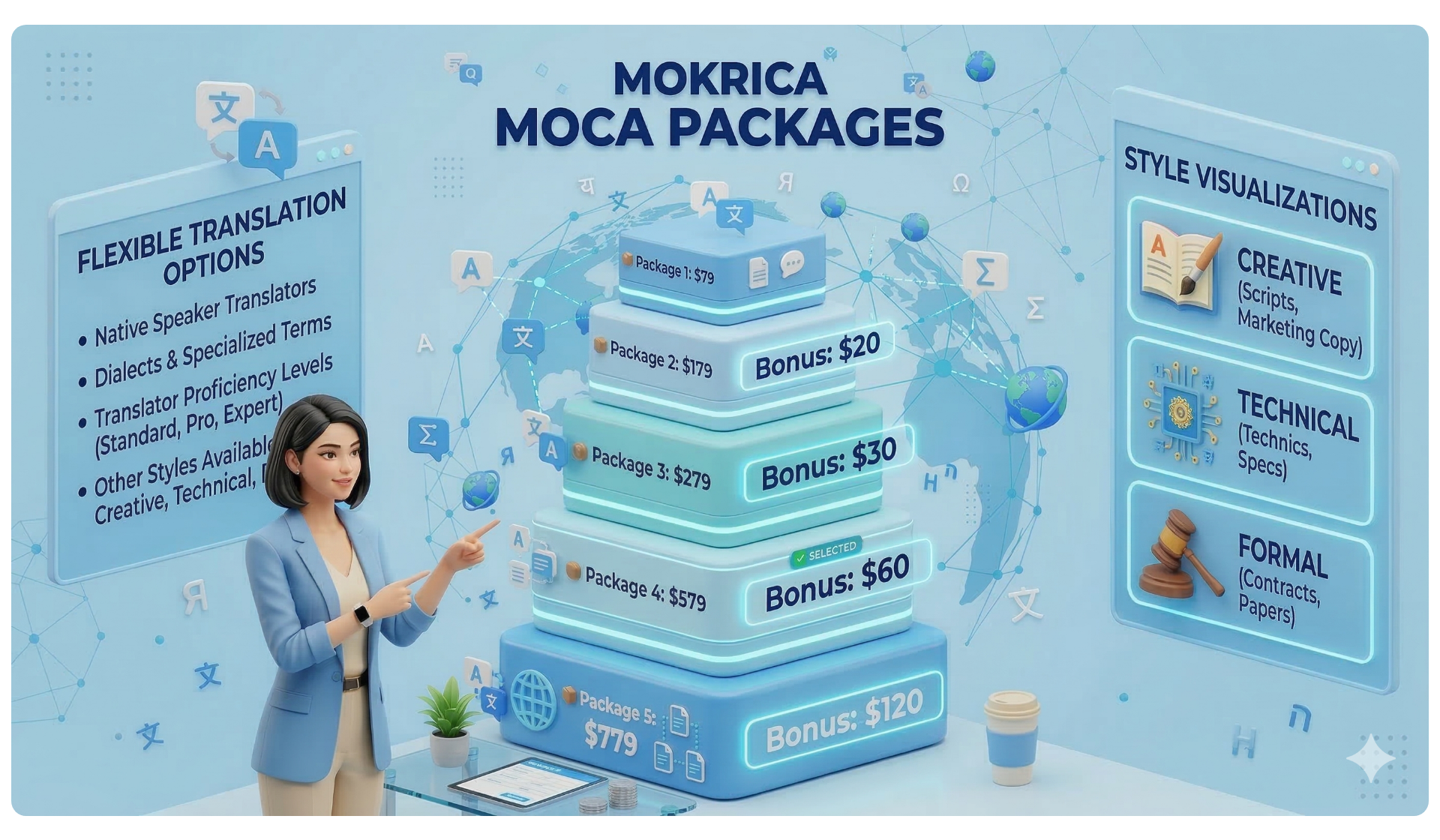
Moca Package is a flexible translation solution designed to help you create projects faster, manage budgets more easily, and handle translation workflows more efficiently on the Mokrica platform.
You can create projects more conveniently, track your available budget more clearly, and continue managing translation requests whenever needed — without dealing with complicated manual processes.
⭐ Available Budget
You always have a ready-to-use budget for creating translation projects:
📦 Package 1: $79
📦 Package 2: $179 — Receive an additional $20
📦 Package 3: $279 — Receive an additional $30
📦 Package 4: $579 — Receive an additional $60
📦 Package 5: $779 — Receive an additional $120
⭐ Terms & Conditions
1. The Moca Package can only be used to create translation projects on the Mokrica platform.
(1 Moca = 1 USD)
2. The Moca Package cannot be converted into cash.
3. After you complete payment for the Moca amount used in a project, your package limit will automatically be restored to its original amount.
4. Once your limit has been restored, you can continue creating new projects on the Mokrica platform.
5. While using the Moca Package, your account may accumulate rewards and benefits according to Mokrica platform policies.
6. You can upgrade your Moca Package to receive a higher limit and create larger-value projects.
7. If your available Moca limit is not sufficient for a project, you can still make online payments through the payment gateways integrated into the Mokrica platform without affecting your current Moca Package.
⭐ How the Moca Package Works
📄 Create a translation project
💳 Pay for the Moca amount used
🔄 Your limit is automatically restored
📦 Continue creating new projects
🎁 Accumulate rewards and benefits through the Moca Package
⭐ Moca Package Benefits
✅ Commission: 5% – 10% per order, calculated based on the number of words.
✅ Reward: 0.5% – 3% per order, calculated based on the order value.
✅ CDR Bonus (10%): Applied when completing more than 10 orders per month.
✅ TMR Bonus (5%): Partner Channel policy.
Related tags
🏷️ Translation for Businesses
🏷️ Outstanding Benefits of the Moca Package
🏷️ How the Moca Package Works
🏷️How to Restore Your Moca Package Budget
🏷️How to upgrade Moca Package
Benefits of the Moca Package

Benefits of the Moca Package
📌 Why Are More Businesses Choosing the Moca Package for Greater Flexibility in Managing Translation Needs?
🌟 Key Benefits of the Moca Package
🚀 More flexible translation budget management for modern businesses
As translation needs continue growing, many businesses still manage projects manually and separately.
Each request often involves multiple steps such as:
• Sending files and waiting for confirmation
• Completing payment before processing begins
• Tracking each project individually
• Difficulty managing budgets over time
• Workflow interruptions when new requests arise
👉 This can slow down processing times and affect a company’s ability to maintain smooth day-to-day operations.
⭐ Create translation projects more efficiently with the Moca Package
The Moca Package is designed to help businesses maintain continuous translation workflows, create projects more flexibly, and handle multilingual requests more efficiently whenever needed.
📦 Activate your Moca Package → Instantly access available budget
📄 Upload documents → Create projects within minutes
⚙️ System processing → Translation workflows are connected and deployed
💳 Pay for the Moca amount used → Your limit is automatically restored
➡️ Maintain smoother ongoing operations whenever new translation needs arise
💡 Handle translation needs anytime with greater flexibility
With its flexible budget mechanism, businesses can create projects immediately whenever translation needs arise — without going through multiple manual steps beforehand.
✔ Create projects as soon as requests come in
✔ No need to process separate payments for every individual project
✔ Easier to maintain workflow continuity when handling large volumes of documents
✔ More convenient budget tracking and translation management
⚡ Why are more businesses choosing the Moca Package?
🔹 Pay Based on Actual Usage
Your business only pays for the amount of Moca that has been used.
👉 Use only what you need — pay only for what you use
👉 Avoid unnecessary budget waste
👉 Reduce unexpected or uncontrolled costs
🔹 Automatic Limit Restoration After Payment
Once payment for the used Moca amount is completed, your available limit is automatically restored to its original amount.
🚀 This allows you to continue creating new projects immediately without interrupting ongoing workflows.
🔹 More Transparent Budget Control
All transactions are updated directly within the system.
✔ Easier to track
✔ Easier to manage
✔ Easier to optimize budgets at different operational stages
🌍 Suitable for multiple industries and business models
The Moca Package is designed for businesses that regularly manage multilingual documents and ongoing translation needs, including:
• International education and study abroad services
• Import-export and international trade
• Legal and financial services
• Tourism and hospitality
• Technology companies and global startups
• Businesses operating across multiple international markets
• Organizations that frequently process large volumes of documents
💎 The Moca Package not only helps your business create projects faster, but also supports more stable operations as translation demands continue growing.
🚀 Start using the Moca Package today
• Manage your translation budget more proactively
• Create projects faster
• Launch translation requests whenever needed
• Maintain smoother operational workflows with Mokrica
📋 Don’t let translation processes slow down your business growth or create unnecessary operational costs.
Related tags
🏷️ Moca Translation Package
🏷️ Translation for Businesses
🏷️ Outstanding Benefits of the Moca Package
🏷️ How the Moca Package Works
🏷️How to Restore Your Moca Package Budget
🏷️How to upgrade Moca Package
How the Moca Package Works

How the Moca Package Works
The Moca Package helps you take greater control of project creation, translation workflows, and ongoing document processing whenever needed.
You can manage the entire process directly on Mokrica through the following steps:
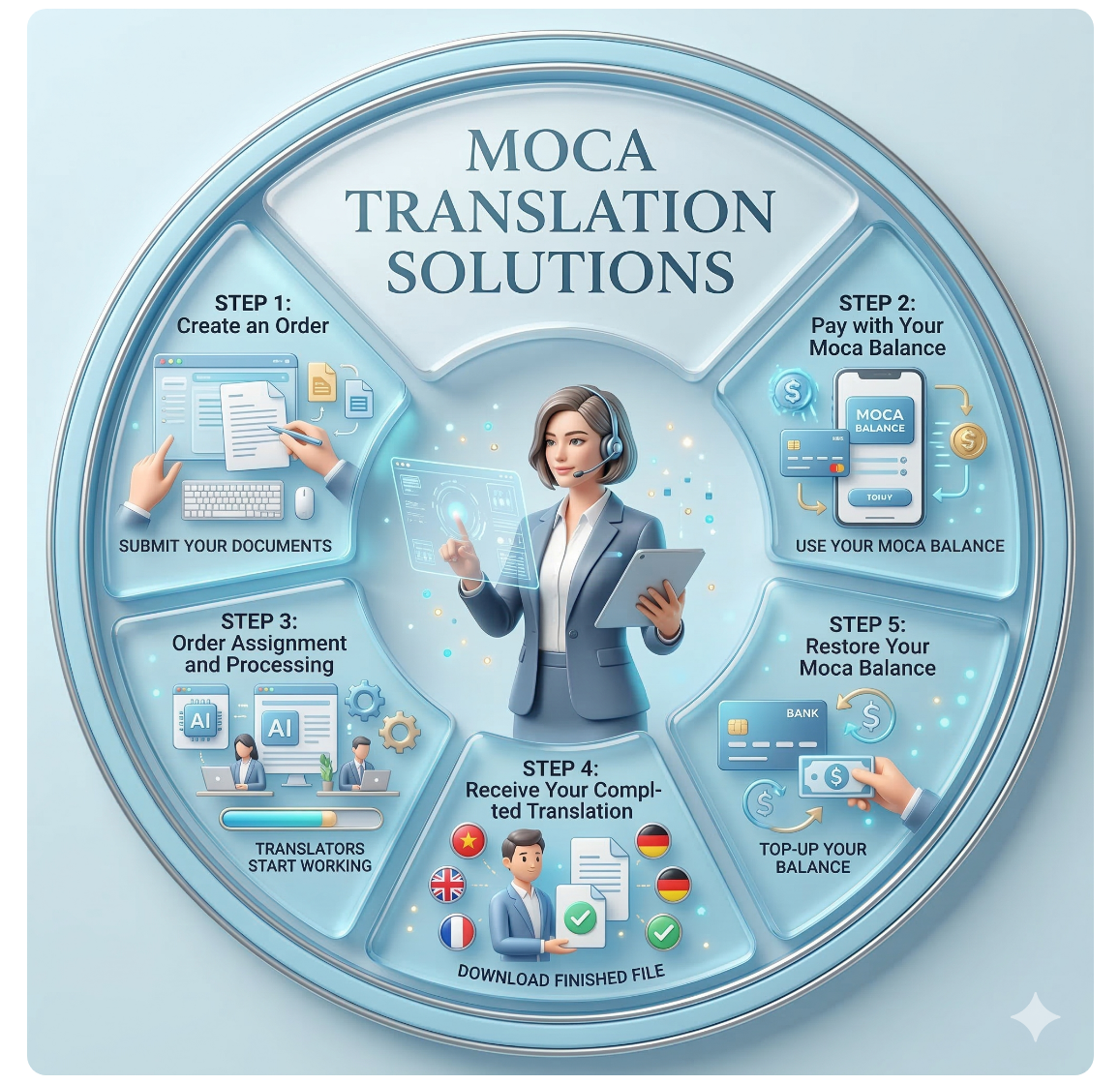
📄 Create a Translation Project
To get started, simply upload your document and set up your translation project information.
Project creation steps
1. Upload the document that needs translation
2. Select the source language
3. Select the target language
4. Choose the document subject or industry field
5. Enter the number of notarized copies (if required)
👉 Once completed, you can review all project details before continuing.
💳 Pay Using Your Moca Balance
After confirming your project details, you can use your available Moca balance to pay directly for the translation project.
👉 The corresponding Moca amount for the project value will be automatically deducted from your available account limit.
If your current limit is not sufficient, you can still:
• Restore your Moca Package limit
• Upgrade to a higher Moca Package
• Or make an online payment for the remaining amount
🔄 Project Matching & Processing
After successful payment, your project will be matched with suitable translators based on:
• Language pair
• Specialization
• Document content
• Compatibility with project requirements
The assigned translator will process and complete the translation according to the “Estimated Completion Time” displayed on the project.
👉 You can track project progress directly within your account.
✅ Receive the Completed Translation
Once the translation is completed, you will receive a notification via email.
You can then:
• Log in to your Mokrica account
• Go to “Translation Orders” → “Completed”
• Download the completed translation file
You will have 72 hours (3 days) to review the translation and request revisions if needed.
After this period, the project will be automatically approved and the translator will receive compensation for the completed work.
🔄 Restore Your Moca Package Limit
To continue maintaining your original usage limit, you simply need to pay for the Moca amount previously used for completed projects.
👉 Once payment is completed, your Moca Package limit will automatically be restored in your account.
📋 Example
• Original Package: 79 Moca ($79)
• Amount Used: 30 Moca
👉 You only need to pay $30 to restore your original limit.
Once completed, your balance will return to 79 Moca, allowing you to continue creating new projects whenever needed.
🚀 Maintain More Flexible Translation Operations with the Moca Package
The Moca Package helps you stay more flexible when creating projects, managing translation workflows, and maintaining continuous processing capacity whenever new requests arise.
👉 Create projects faster
👉 Use your available limit more proactively
👉 Track and manage projects more conveniently
👉 Continue handling new requests without interrupting ongoing workflows
Related tags
🏷️ Moca Translation Package
🏷️ Translation for Businesses
🏷️ Outstanding Benefits of the Moca Package
🏷️ How the Moca Package Works
🏷️How to Restore Your Moca Package Budget
🏷️How to upgrade Moca Package
Restore Moca Budget

Restore Moca Budget
The Moca Package is designed based on the principle “Use First — Pay Later,” allowing businesses to create translation orders whenever needed 💼✨
🎯 How does the budget restoration work?
When you use the Moca Package to create translation orders, the corresponding amount of Moca is deducted from your package limit.
Example:
📦 Activated Moca Package: 79 USD (79 Moca)
📄 Total used: 30 Moca
💰 Remaining budget: 49 Moca
🔄 Steps to Restore Your Moca Package
1️⃣ Log in to your customer account
Access the platform and sign in with your registered credentials.
2️⃣ Open the Payment History section
Here, you can view all orders created using the Moca Package.
3️⃣ Review the orders you have used
✔ Track the list of orders within the month
✔ Check the total Moca used
✔ View details of each order
Then click:
👉 Pay for Orders
4️⃣ Complete the payment
After successful payment:
✅ The system records the payment
✅ Your budget is restored to 79 Moca
✅ You can immediately create new orders 🚀
Once you pay for the amount used, the system automatically restores your Moca Package to the original limit, allowing you to continue using it without interruption.
👉 The Moca Package creates an optimized cycle:
Use → Pay → Restore → Continue Using 🔄
Related tags
🏷️ Moca Translation Package
🏷️ Translation for Businesses
🏷️ Outstanding Benefits of the Moca Package
🏷️ How the Moca Package Works
🏷️How to Restore Your Moca Package Budget
🏷️How to upgrade Moca Package
Upgrade Moca Package

Upgrade Moca Package
Just follow these simple steps:
1️⃣ Log in to your customer account
2️⃣ Select the higher package you want to upgrade to
3️⃣ Confirm and pay the price difference
4️⃣ Upgrade completed successfully
👉 The system will automatically update your new budget immediately after payment.
🔼 Upgrade Your Moca Package — Increase Your Translation Budget Flexibly as Demand Grows
When you have activated a Moca Package and want to upgrade to a higher plan, you do not need to pay the full value of the new package.
👉 You only need to pay the difference between the two plans.
🎯 When should you upgrade your Moca Package?
You should consider upgrading when:
❌ Your remaining budget is not enough for high-value orders
❌ The volume of documents increases suddenly
❌ You need to handle multiple projects at the same time
🧮 Example
📦 Current package: Package 1 — 79 USD (79 Moca)
📄 Total used: 30 Moca
💰 Remaining budget: 49 Moca
You want to upgrade to:
🔼 Package 2 — 179 Moca
🎁 Bonus Moca when upgrading: +20 Moca
💳 Amount required to upgrade
You do not need to pay the full 179 USD.
👉 Only pay the difference between the two packages:
179 USD − 79 USD = 100 USD
⭐ Total budget after upgrading
🔹 Case 1 — Upgrade immediately (without paying for used Moca)
Your actual budget will be:
➡️ 49 Moca (remaining)
➡️ + 100 Moca (upgrade)
➡️ + 20 Moca (bonus)
👉 Total: 169 Moca
The 30 Moca already used has not been paid yet, so it is not restored.
🔹 Case 2 — Pay for used Moca before upgrading
If you pay for the 30 Moca already used, your budget will return to the original amount:
👉 79 Moca
Then upgrade:
➡️ 79 Moca (restored)
➡️ + 100 Moca (upgrade)
➡️ + 20 Moca (bonus)
🚀 Total: 199 Moca
👉 This is the full budget when you receive the complete value of Package 2 plus bonus Moca.
🎯 Important conclusion
To receive the full limit of the new package:
✅ Pay for the Moca already used first
✅ Then perform the upgrade
If you upgrade without paying first, your total budget will be reduced by the amount already used.
⚡ Why does the system work this way?
This mechanism ensures:
✔ Transparency of the used budget
✔ No double counting of consumed funds
✔ Flexible upgrading based on demand
✔ Preservation of the “Use First — Pay Later” principle
🏆 Optimal choice for businesses
👉 Need a higher budget immediately: upgrade directly
👉 Want the full value of the new package: pay used Moca first
🚀 Upgrade today
Don’t let budget limits slow down your progress.
👉 Upgrade your Moca Package
👉 Get additional budget instantly
👉 Continue creating orders without interruption
💼 Moca Package — A flexible translation solution for modern businesses ✨
Related tags
🏷️ Moca Translation Package
🏷️ Translation for Businesses
🏷️ Outstanding Benefits of the Moca Package
🏷️ How the Moca Package Works
🏷️How to Restore Your Moca Package Budget
🏷️How to upgrade Moca Package
Enterprise Translation Solutions
Enterprise Translation Solutions
🚀 Standardize Translation Workflows — Scale Multilingual Operations More Efficiently with Mokrica
🌍 WHEN TRANSLATION BECOMES PART OF BUSINESS OPERATIONS
Today, many businesses are no longer handling just a few isolated documents — they are managing multiple languages, multiple markets, and growing volumes of multilingual content simultaneously.
📋 From contracts and websites to marketing content and customer documentation, multilingual operations are becoming an increasingly important part of international business expansion.
Managing multiple languages and projects at the same time often creates operational challenges such as:
● Manual quotation workflows that slow down processing
● Difficulty managing multiple documents and projects simultaneously
● Lack of coordination across teams and workflows
● Limited visibility into project statuses
● And increasing translation costs as operations expand into new markets
👉 This is when businesses need a system that makes multilingual workflow coordination and project execution more streamlined and scalable.
⚡ INSTANT QUOTES — FASTER PROJECT DEPLOYMENT
You no longer need to wait for traditional quotation processes.
👉 Simply upload your documents directly to Mokrica:
● the system automatically scans the content
● analyzes word counts
● recommends suitable language pairs
● and generates instant quotes directly on the platform
📋 This helps businesses respond more quickly and manage multiple translation requests more efficiently.
🚀 CENTRALIZED TRANSLATION MANAGEMENT FOR BUSINESSES
Mokrica helps businesses manage multilingual workflows through one centralized system instead of relying on fragmented comproject activitymunication across emails, files, or multiple tools.
👉 You can:
● Create translation orders online
● Monitor project progress in real time
● Manage multiple documents and projects simultaneously
● Review order and payment history
● And receive notifications directly on the platform
📋 All activities are updated transparently to help businesses coordinate projects more efficiently and maintain better project visibility.
💎 CREATE A DEDICATED BUSINESS CHANNEL ON MOKRICA
For businesses withongoing multilingual workflows, Mokrica supports dedicated Business Channels to help centralize multilingual workflows more effectively.
👉 Business Channels help companies:
● Build their own operational workspace
● Connect with suitable translators
● Monitor project progress
● Optimize operational costs and turnaround times
📋 Businesses can transition from fragmented manual workflows to a more centralized and flexible multilingual workflow model.
🌐 BUILD FLEXIBLE TRANSLATOR TEAMS BASED ON BUSINESS NEEDS
Mokrica Channels allow businesses to build translator teams tailored to different markets, languages, and industry specializations.
👉 Including:
● inviting translators into the Channel
● automatically assigning projects based on project requirements
● coordinating multilingual workflows across industries and language pairs
● scaling translator teams flexibly as operational needs grow
👉 The right people — for the right projects — at the right time.
📋 Businesses simply use their available Moca budget to create projects directly within the Channel, while translators can flexibly receive and process projects based on language expertise and specialization.
💳 MOCA PACKAGE — A TRANSLATION BUDGET ALWAYS READY
Instead of making separate payments for every translation request, businesses can use the Moca Package as a flexible multilingual operating budget directly on Mokrica.
👉 This helps businesses:
● create projects more quickly
● maintain uninterrupted multilingual workflows
● manage operational budgets more transparently
● and process multiple requests more efficiently
📋 After paying for the used Moca amount, the system automatically restores the original package limit so businesses can continue creating new projects without interruption.
👉 This is an ideal solution for businesses operating multilingual workflows continuously and at scale.
💎 EARN ADDITIONAL LONG-TERM VALUE FROM EVERY PROJECT
In addition to helping businesses manage multilingual workflows more efficiently, Mokrica also integrates reward and value accumulation mechanisms based on project activity within the platform.
👉 Including:
● commissions based on word volume (10%)
● rewards based on project value (0.5%–3%)
● CDR rewards (10%) for completing 10 or more projects monthly
● and 5% TMR rewards for Business Channels based on total Channel project value
📋 This allows businesses not only to optimize operational workflows and costs — but also to build additional long-term value while expanding global content operations
📊 MORE TRANSPARENT MANAGEMENT AND COLLABORATION
All workflow activities are updated directly on the platform, helping businesses monitor and manage multilingual operations more transparently throughout the entire process.
👉 Including:
● tracking individual project statuses
● reviewing translation content and revision requests
● managing processing and payment history
● approving translations directly on the platform
📋 This helps multilingual operations become more transparent, organized, and scalable as businesses manage multiple projects simultaneously.
Mokrica is built to support businesses operating across multiple languages and international markets. ⭐⭐⭐
💎 SUITABLE FOR
✔ Businesses with ongoing translation needs
✔ Companies expanding into international markets
✔ Multilingual content and marketing agencies
✔ Organizations managing multilingual documentation
🌍 A comprehensive solution that helps businesses optimize operational efficiency while scaling international activities more effectively.
👉 Start with Mokrica to standardize multilingual workflows, centralize operations, and scale multilingual business activities more efficiently.
Moca Package FAQ
🔹 What is the Moca Package?
The Moca Package is a pre-available translation budget that helps you proactively create and manage translation orders more conveniently whenever needed.
🔹 How does the Moca Package work?
When you create a translation order, the system will automatically use the corresponding amount of Moca based on the order value in your account. After paying for the Moca used, your limit will be restored so you can continue creating new orders.
🔹 How much is 1 Moca worth?
1 Moca is equivalent to 1 USD on the Mokrica platform.
🔹 What is the Moca Package used for?
The Moca Package is used to create and manage translation orders on the Mokrica platform.
🔹 Can I create translation orders immediately after activating the Moca Package?
Yes. Once activated successfully, your Moca balance will appear directly in your account so you can create orders immediately.
🔹 Does the Moca Package help create orders faster?
Yes. The Moca Package helps you proactively create translation orders faster whenever new requests arise without going through multiple manual steps.
🔹 Can I create multiple orders at the same time using the Moca Package?
Yes. You can create multiple orders simultaneously as long as your available Moca limit is sufficient.
🔹 Can I use the Moca Package for multiple languages?
Yes. You can use the Moca Package to create translation orders for different languages based on your needs.
🔹 What file formats can I upload?
You can upload common file formats such as .doc, .docx, .pdf, .ppt, .pptx, .xls, .xlsx, .txt, .jpg, and .png on the Mokrica platform.
🔹 How are suitable translators recommended for my order?
Suitable translators are recommended based on factors such as language pairs, specialization, experience, and compatibility with your document content to support a more effective translation process.
🔹 When will Moca be deducted?
Moca will be deducted immediately after you confirm the order and use the Moca Package for payment.
🔹 Where can I check my remaining Moca balance?
You can check your Moca balance and usage history in the “Moca Budget” section of your account.
🔹 Can I view my Moca usage history?
Yes. You can view your Moca usage history, including created orders and your current Moca balance in your account.
🔹 What should I do if the order value exceeds my remaining Moca balance?
You can:
• Pay online for the order
• Restore your current Moca Package limit
• Or upgrade to a higher Moca Package that better fits your usage needs
🔹 How can I restore the original limit of my Moca Package?
You simply need to pay for the amount of Moca you have used, and your original limit will be automatically restored in your account.
🔹 After restoring the limit, can I continue creating new orders?
Yes. Once your limit has been restored, you can continue creating new orders on the Mokrica platform.
🔹 Can I upgrade my Moca Package?
Yes. You can upgrade your Moca Package to receive higher usage limits and additional benefits that better match your translation needs.
🔹 Can I use Moca together with online payments?
Yes. If your Moca limit is insufficient, you can still make online payments without affecting your current Moca Package.
🔹 Can the Moca Package be converted into cash?
No. Moca cannot be converted into cash and is used to create translation orders while accumulating benefits according to Mokrica’s applicable policies.
🔹 Does the Moca Package expire?
The Moca Package does not expire. You only need to activate the package once and use it whenever translation requests arise.
🔹 Does the Moca Package accumulate rewards and benefits?
Yes. During the process of creating translation orders, your account may accumulate rewards such as Commissions, Rewards, CDR, and TMR (if applicable).
🔹 What rewards can I receive when using the Moca Package?
You may receive:
• Word-based commissions
• Rewards based on order value
• CDR bonuses based on the number of orders
• TMR bonuses according to the Partner Channel policy
🔹 How are commissions and rewards calculated?
Commissions and rewards are calculated based on the total word count and the value of your translation orders.
🔹 When is the CDR bonus applied?
The CDR bonus is applied when the number of translation orders you create within a month exceeds 10 orders.
🔹 What is the TMR bonus?
TMR is a 5% reward policy applied to Partner Channels according to Mokrica’s current policy.
🔹 Can I track the progress of my orders?
Yes. You can track the processing status of your orders directly in your account.
🔹 Will I receive notifications when the translation is completed?
Yes. The system will send notifications via email and update the order status once the translation is completed.
🔹 How is the translation turnaround time determined?
The turnaround time is determined based on the word count, language pair, and specialization of the document.
🔹 How long do I have to review the translation?
You have 72 hours (3 days) to review the translation after receiving the completion notification.
🔹 What if I need revisions to the translation?
You can submit a revision request directly through the Mokrica system so the translator can review and adjust the content according to your request.
🔹 How will I receive my translated document?
Once the translation is completed, you will receive a notification and can log in to your account to download the document in the “Completed” section.
🔹 Are my documents kept confidential?
Yes. All documents on the Mokrica platform are kept confidential and are only used for processing translation orders.
🔹 Do translators use AI or machine translation?
Translations are completed by professional translators. In some cases, translators may use translation support tools, but the final content is always reviewed and completed by humans.
🔹 Is the Moca Package suitable for businesses that frequently process documents?
Yes. The Moca Package is designed for businesses that need to maintain a more continuous and flexible translation workflow.
🔹 Is the Moca Package suitable for multilingual organizations?
Yes. You can use the Moca Package to manage translation requests for multiple languages and various fields.
🔹 Can I create orders outside business hours?
Yes. You can create and manage translation orders online anytime on the Mokrica platform.
🔹 Where can I contact Mokrica for support?
You can contact the support team via email or through the support center on the Mokrica platform.
📧 Support Email: info@mokrica.com
🔹 What should I do if I encounter issues with my order?
You can review your order information in your account or contact the Mokrica support team for assistance in specific cases.

Sat Industries

Weiss Asia

KuKa Automation

IME Trading

Seng Heng


